 WarRoster
Player guides
Get from a blank roster to the final score.
These short walkthroughs cover the main alpha workflows. Names and options can vary by game and faction, but the path stays consistent.
Guide 1 · Roster
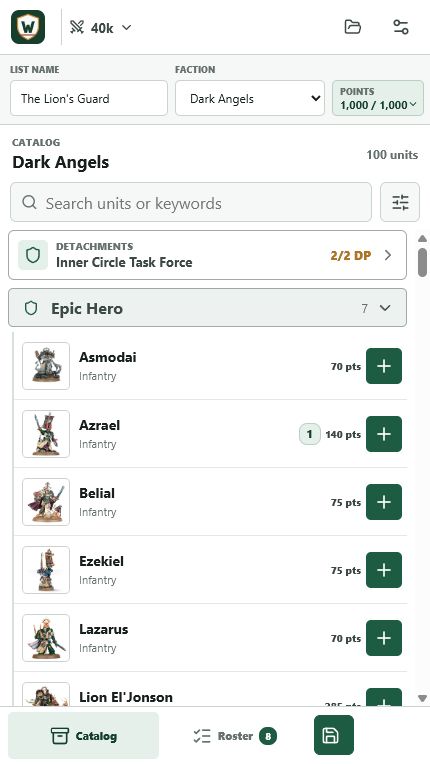
Build your first list
Choose the game
On first launch, select the games you want WarRoster to show. If only one is selected, WarRoster takes you directly to that game hub.
Set the roster
Name the list, choose a faction, and pick a battle size. For 40K, select the detachment before adding enhancements.
Add and configure units
Points appear beside each add button. Open a roster entry to set its model count, free wargear, paid upgrades, leaders, and eligible enhancements.
Save the roster
The total updates as selections change. Save from the bottom navigation, then reopen the list later from your saved rosters.
Guide 2 · Transfer
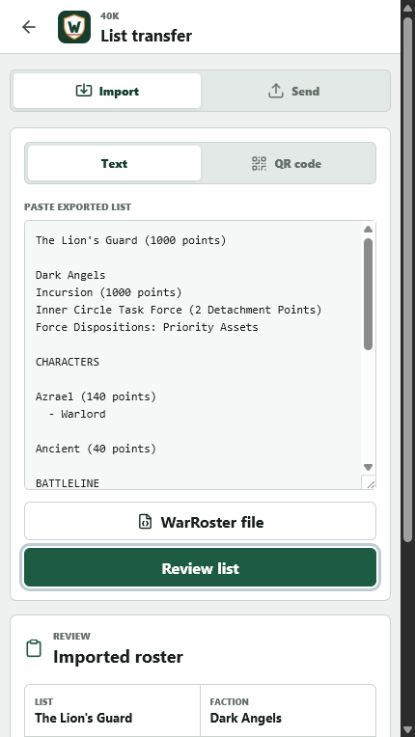
Import or share a roster
Open Import and share
Choose Import for a roster you received, or Send for one already saved in WarRoster.
Choose the format
Paste readable roster text, scan a WarRoster QR code, enter its share code, or open a WarRoster JSON file.
Review uncertain matches
If a faction, unit, point total, enhancement, or wargear option is uncertain, use the review screen to resolve it before saving.
Send the useful version
Use plaintext for a human-readable list, QR for another nearby device, or JSON when you want the richest WarRoster-to-WarRoster transfer.
Guide 3 · Battle
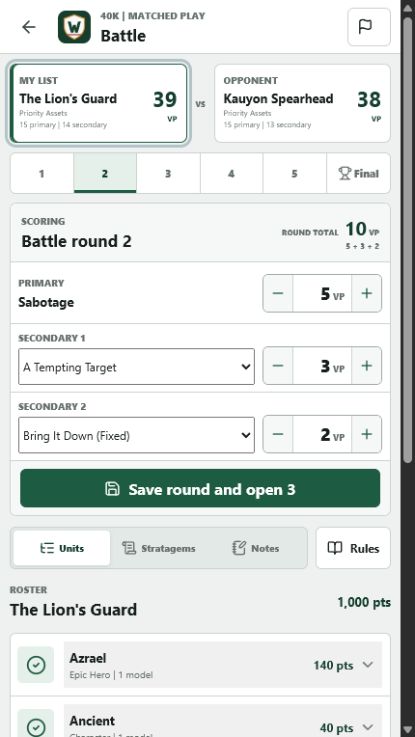
Track a five-round game
Start from the game hub
Select your list and, when available, your opponent's list. Continue to mission setup before the first round.
Set mission choices
Choose the force disposition, primary mission, tactical or fixed secondaries, and Battle Ready status. Fixed secondaries carry into scoring automatically.
Score each round
Record primary and secondary values, then save the round to move forward. Each round remains available from its tab for corrections.
Use the roster reference
Expand a unit to see its configured weapon pool. Open Abilities or the rules reference for definitions without losing the current score.
Review the final
The Final tab combines round scoring and Battle Ready for the completed total.
Try the flow
Build a roster in the live alpha.
Your current alpha data stays in this browser unless you export it.